Drive with us
Drive your car with InstaRide
Every request near you in one list, and your net shown before you accept.
- Car · scooter and van soon
- Nearest requests first
- Captain office at Khufu Gate
Why InstaRide?
Work your way, with clear money
Everything is clear from the start: the commission, your balance and the hours.
Your net, before you accept
Every request shows the fare and your net; the commission comes out of your wallet after the trip.
Taking your balance out
Message us on WhatsApp and we'll transfer it to you.
You choose your hours
The app works when it suits you, with no compulsory shifts.
Requests close to you
Every request near you shows in one list, nearest first; the building number shows once the rider confirms you.
"Women riders only" for women captains
Women captains can take requests from women riders only, and hide their photo from men riders.
Support and safety all operating hours
A support and safety team on hand all operating hours.
Vehicles
What you can drive
Cars now, scooters and vans soon — each with its own requirements.

Car (Car or Premium)
Car: any car that passes the inspection. Premium: a 2020 model or newer with working AC.
Up to 4 riders- Coming soon
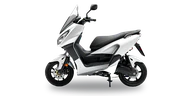
Scooter
One rider only, with two helmets: one for the captain and one for the rider.
1 rider - Coming soon
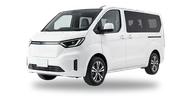
Van
For family rides, luggage and groups.
Up to 7 riders
Required documents
The documents you'll need
You upload them from the app; the vehicle inspection happens at the captain office.
Car
4 documents- National ID, front and back
- Driving licence
- Vehicle licence, front and back
- A photo of the car
Scooter and van
Coming soon: we'll list their documents when they open.
In the app you also fill in the vehicle's details: plate, make, model and colour.
How to start
4 steps and you're driving
- 1
Get the app and sign up
Get the captain app and sign up with your mobile number.
- 2
Upload your documents
Photograph your documents in the app and follow the status of each one.
- 3
Book your inspection
Pick a time at the captain office for the vehicle inspection.
- 4
Start taking requests
Once approved, top up your wallet and open the app.
Captain office
Inspection and documents at Khufu Gate
Captain office
- Hadayek El Ahram, Khufu GateFull address coming soon
- Opening hours coming soon
Book the vehicle inspection from the app, and top up your wallet in cash at the office.
Captain questions
Questions captains ask
When do I know what I'll make from a trip?
How do I take my balance out?
Can I drive a car that isn't in my name?
Where and how is the inspection done?
Start with InstaRide Captain
Get the captain app, sign up with your mobile number, and upload your documents from the app.